
Picking a CMMS platform is one of those decisions facility teams make rarely enough that they don’t get to build up much pattern-matching experience — which is exactly the situation a sales demo is designed to exploit. A polished interface, a long feature list, and a confident sales pitch tell you almost nothing about whether the platform will actually get used six months in, once the novelty wears off and it has to survive contact with a busy facility team’s actual daily routine.
The stakes are higher than a typical software purchase because switching costs are real. A CMMS accumulates years of asset history, vendor relationships, and workflow habits — migrating off a platform two years in means either losing that history or spending significant time and money porting it somewhere else. That’s exactly why it’s worth spending real evaluation time up front rather than treating it as a quick procurement decision, because the cost of picking wrong doesn’t show up at signing, it shows up eighteen months later when the platform still isn’t being used consistently and nobody wants to admit the selection was a mistake.
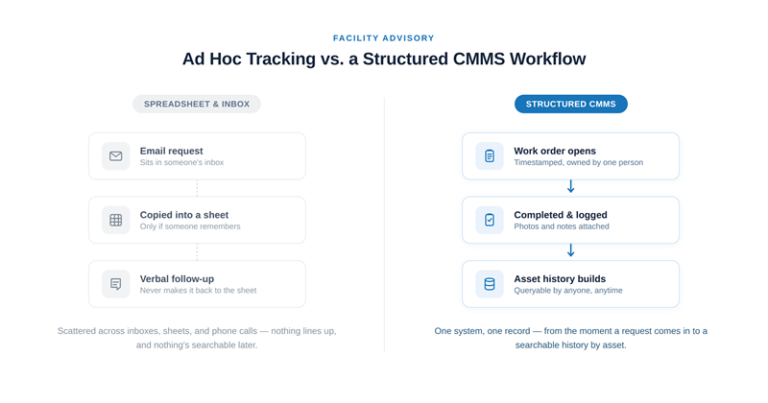
A few questions cut through the sales pitch faster than a feature checklist. First: does it fit the workflow your team already has, or does it require your team to change how they work to fit the software? The second is usually the more expensive mistake, because adoption dies quietly — nobody announces “we’ve stopped using the CMMS.” People just go back to spreadsheets and phone calls for the parts of the workflow that don’t fit cleanly, and the CMMS becomes a system of record for maybe sixty percent of what’s actually happening, which is arguably worse than no system at all because it creates false confidence that the data is complete.
Second: can your vendors work inside it without friction? This is the question facility teams underweight most often, because it’s evaluated from the buyer’s seat during the demo, not from the vendor’s seat where the actual data entry happens. If every service provider needs a separate login, separate training, and a separate reporting format that doesn’t map cleanly to how they already document work, that overhead gets passed back to your team eventually — usually as inconsistent documentation, delayed entries, or vendors quietly falling back to email and PDFs for the parts of the process the platform makes difficult. Vendor-side compatibility is worth testing before signing, not after — ask a prospective platform how a multi-trade vendor’s technician actually closes out a work order in the field, not just how the dashboard looks from an office chair.
Third: what does the data actually let you do a year from now? Work order history is only useful if it’s queryable in the ways that matter for real decisions — if you can pull “every HVAC call at this location in the last 18 months, sorted by cost” in under a minute, that’s a platform doing its job. If getting that answer means asking someone to manually dig through old tickets or export data into a spreadsheet to analyze it properly, the platform is functioning as a filing cabinet, not a decision-support tool, regardless of how it’s marketed.
There’s a fourth question worth asking that’s easy to skip during a demo: what happens to your data if you leave? A platform that makes export difficult, or that stores data in a proprietary format with no clean path out, is optimizing for lock-in rather than for being the best tool for your team. That’s a legitimate business model for the vendor, but it’s worth knowing in advance rather than discovering it the day you decide to switch.
None of this requires picking the platform with the most features, the newest interface, or the longest roadmap of promised additions. It requires picking the one your team and your vendors will actually use consistently, because a CMMS that’s ignored — or used inconsistently — is worse than no CMMS at all. It creates the appearance of documentation without the substance, and a facility manager relying on that data for a capital planning decision or an audit response is relying on something less complete than it looks.
A practical way to stress-test a shortlist before committing is to run a small pilot with actual vendors and actual buildings rather than a sandbox demo environment with sample data. A sandbox always looks clean because nobody’s put real friction through it yet. A pilot with one location, one or two vendors, and thirty to sixty days of real work orders will surface the adoption problems — the field that’s awkward to fill out on a phone, the report format a vendor’s back office can’t easily produce, the mobile app that drains battery on a technician’s device — long before a full-portfolio rollout does, when those same problems are far more expensive to discover and fix.
It’s also worth asking a shortlisted vendor directly how their platform handles the messy, non-ideal cases rather than only the clean ones: a work order that gets reassigned mid-job, a vendor who needs to attach documentation after the fact because they were offline on-site, a location with intermittent connectivity where mobile sync matters more than the interface. Platforms differ a lot on these edges even when they look nearly identical on the happy path a demo usually shows, and the edges are exactly where a CMMS earns or loses a facility team’s trust over time. For a closer look at how a properly used platform should function day to day, see how our technology platform tracks work orders end to end.