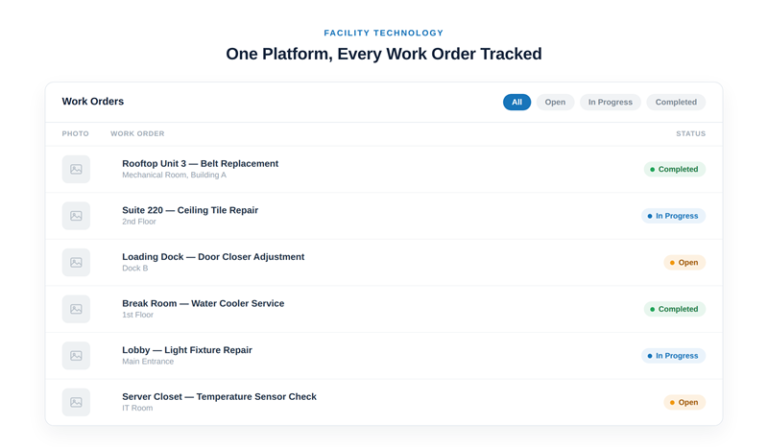
“Powered by our technology platform” is one of those phrases that can mean almost anything, so it’s worth being specific about what it actually covers for Kibog: every work order — status, photos, and completion notes — tracked in one system, for every building in a portfolio, instead of scattered across email threads, text messages, and whichever technician happened to take the call and whichever notebook or memory that call ended up living in.
Start with what tracking a single work order actually looks like end to end. A request comes in — a phone call, an email, or a sensor threshold being crossed — and it becomes a work order with a timestamp, an owner, and a status that updates as the job moves from open to in progress to completed. A technician on-site can attach photos before and after the repair. Completion notes describe what was actually done, not just that “the issue was resolved.” None of that is unusual on its own — most service businesses can describe a single job reasonably well after the fact if you ask them directly. What’s unusual is doing it consistently, for every job, without relying on someone remembering to write it down.
The practical difference shows up over time, not on any single job. A single work order tracked well is nice to have. A year of work orders tracked well is an asset history — a record of what’s broken, how often, and what it cost to fix, by location and by piece of equipment. That’s the difference between reacting to problems and being able to see them coming, whether that’s a unit that’s had three service calls in six months signaling it’s heading toward a bigger failure, or a location with a pattern of repeat issues that nobody had noticed because the data for each individual call lived in six different inboxes and was never assembled into a single view.
It also changes what a facility manager can actually do with a portfolio of buildings instead of just one. Comparing maintenance cost and call frequency across locations only works if every location’s data is captured the same way, in the same system, on the same schedule. A portfolio where three buildings use one vendor’s documentation format and two use another’s isn’t really comparable — it just looks comparable until someone tries to actually pull the numbers side by side and finds the gaps.
It also changes what Services actually deliver as a document, not just a repair. Photos and completion reports on every job mean a facility manager or an auditor has something concrete to point to, not a vendor’s word that the work happened. That documentation matters most in exactly the moments a facility manager can’t predict in advance — an insurance claim, a tenant dispute, a compliance audit, a new stakeholder asking for maintenance history on a building they just inherited responsibility for. In every one of those situations, “we did the work” is a much weaker position than “here’s the timestamped record with photos.”
The same underlying platform is what turns a sensor reading into a work order automatically on the IoT Solutions side — the mechanism is the same whether the work order originated from a phone call or a sensor threshold being crossed. A leak sensor triggering a work order and a facility manager calling in a leak both land in the same system, get tracked the same way, and produce the same kind of documented record. That consistency is what makes it possible to eventually treat sensor-originated and human-originated work orders as part of one maintenance history rather than two separate systems that happen to share a building.
For a facility manager overseeing several buildings, the platform’s real value shows up most clearly at the portfolio level rather than the single-building level. A dashboard that rolls up status across every location — how many open work orders right now, which locations are trending toward more service calls than usual, which vendors are hitting their confirmed response windows and which aren’t — turns a set of individually-manageable buildings into something that can actually be managed as a portfolio, with patterns visible across the whole set instead of buried inside each building’s own history.
None of this requires a facility team to change how they interact with Kibog day to day — calling in a request still works exactly like calling in a request. What changes is what happens after that call, and whether the record of it is still useful a year later, whether that’s for a capital planning conversation, an insurance claim, or simply answering a straightforward question — “how many times has this happened here” — without having to go dig for the answer.
Access is also worth a direct note, since “our own platform” can sound like it’s built for internal use only. In practice, a facility manager should be able to see their own building’s work order history directly — status, photos, completion notes — rather than having to request it from an account manager every time a question comes up. The platform exists to make that information available to the people who actually need it, not just to organize it internally for the vendor’s own operational convenience.